
As the headline says, it’s all about port scanning today. When a computer sends SYN to another computer, the remote computer will usually answer with SYN + ACK or RST. By this fact, we can test if a port is open or not.


Different port scanners can be used to test whether a port is open or not. Or Test-NetConnection or a self-created script. Remember Test NetConnection:

But if you try to test multiple computers and multiple ports you are faced with an error message.

The following function addresses this issue. Test-OpenPort allows testing multiple computers and multiple ports at once.
Test-OpenPort
Before we get to the function itself, I would like to show my function in action. The function has two parameters: Target and Port.
Test-OpenPort -Target 192.168.0.1 -Port 80

These parameters are not named, so therefore you can omit the parameter names.
Test-OpenPort 192.168.0.1 80
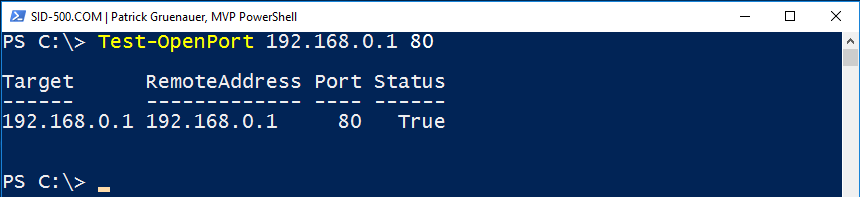
You can also omit the Target. The default value for this parameter is localhost.
Test-OpenPort -Port 80,443

Running on multiple computers and ports requires the use of a comma.
Test-OpenPort 192.168.0.1,sid-500.com -Port 80,443

The screen’s output is an object. Therefore you are able to customize this object with Select-Object or the Format-Commands (Format-Table …)
Test-OpenPort 192.168.0.1,sid-500.com -Port 80,443,53 | Sort-Object Status

For a more sweeter view:
Test-OpenPort 192.168.0.1,sid-500.com -Port 80,443,53 | Sort-Object Status | Out-GridView

The Function
Copy this function into your PowerShell ISE session and press the green start button.
function Test-OpenPort {

<#

.SYNOPSIS
Test-OpenPort is an advanced Powershell function. Test-OpenPort acts like a port scanner.

.DESCRIPTION
Uses Test-NetConnection. Define multiple targets and multiple ports.

.PARAMETER
Target
Define the target by hostname or IP-Address. Separate them by comma. Default: localhost

.PARAMETER
Port
Mandatory. Define the TCP port. Separate them by comma.

.EXAMPLE
Test-OpenPort -Target sid-500.com,cnn.com,10.0.0.1 -Port 80,443

.NOTES
Author: Patrick Gruenauer
Web:
https://sid-500.com

.LINK
None.

.INPUTS
None.

.OUTPUTS
None.

#>

[CmdletBinding()]

param

(

[Parameter(Position=0)]
$Target='localhost',

[Parameter(Mandatory=$true, Position=1, Helpmessage = 'Enter Port Numbers. Separate them by comma.')]
$Port

)

$result=@()

foreach ($t in $Target)

{

foreach ($p in $Port)

{

$a=Test-NetConnection -ComputerName $t -Port $p -WarningAction SilentlyContinue

$result+=New-Object -TypeName PSObject -Property ([ordered]@{
'Target'=$a.ComputerName;
'RemoteAddress'=$a.RemoteAddress;
'Port'=$a.RemotePort;
'Status'=$a.tcpTestSucceeded

})

}

}

Write-Output $result

}
Make it permanent
If you like my approach open PowerShell ISE. Copy the function into your ISE session. Create a folder in C:\Program Files\Windows PowerShell\Modules and save the code as psm1 file. Make sure that your file name and folder name match.
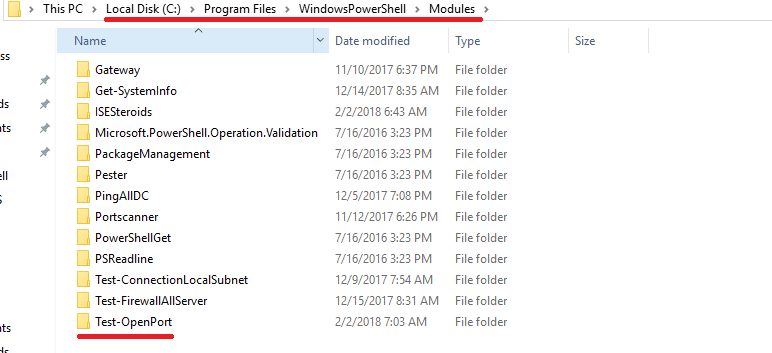

Close PowerShell. Open PowerShell again. The command is now available for all users. Have fun with Test-OpenPort!
Categories: Cyber Security, PowerShell

 My name is Patrick Gruenauer. From Austria.




Will this work with other protocols other than TCP? UDP for example.
LikeLike
Superb! Thank you Patrick Gruenauer ❤
LikeLiked by 1 person
PS> $pcname = foo.bar.local
PS> $ports = 135, 443, 445, 3389, 3268
PS> foreach ($p in $ports) {Test-NetConnection -port $p -computername $pcname}
LikeLike
For someone who wants to test a port on multiple server and server list is in a txt file
PS C:\> $server = Get-Content -path “C:\ServerList.txt”
PS C:\> Test-OpenPort -Target $server -Port 443 | Sort-Object Status | Out-GridView
LikeLike
Patrick Gruenauer you are awesome. Thanks a lot.
Is there a way we can reduce the PingReplyDetails (RTT) from 6 ms to something lesser?
LikeLike
Hi, thx a lot. Don’t know must have a look at.
LikeLike
I’m trying to prompt for the server names and the ports to scan and pass those variables into your function but not having any luck.
below i have the two variables of the server names prompt and the ports prompt, then passing into your function call.
I am not extremely proficient in powershell but tinker with it, and this would be super helpful if this is possible.
Can you advise if this can be done?
______________________________________________________________________________________________________
$servernames = Read-Host -Prompt “Enter Server Names or IPs separated by commas – no spaces (Then press ENTER)”
$ports = Read-Host -Prompt “Enter Port Numbers Separated by Commas – no spaces (Then press ENTER)”
Test-OpenPort -Target $servernames -Port $ports
______________________________________________________________________________________________________
your function is below no changes made
LikeLike
Thank you for your comment. I guess a good way could be checking the scope of the variables.
LikeLike
Tried it out. The problem is that Read-Host saves your input as a string.
Try to separate the values with the split method as shown below and then it works!
PS C:\> $servers
sid-500.com,cnn.com
PS C:\> $server1=$servers.split(‘,’)
PS C:\> $server1
sid-500.com
cnn.com
PS C:\> Test-OpenPort -Target $server1 -Port 443
Target RemoteAddress Port Status
—— ————- —- ——
sid-500.com 192.0.78.25 443 True
cnn.com 151.101.129.67 443 True
LikeLike