
With PowerShell, we can do almost anything. Among other things, we can use the Windows Registry to customize graphical elements, such as changing the support phone number displayed in the Control Panel. In this blog post, I will show how to modify the support number and also demonstrate a few additional examples.
Let’s dive in.
You already know that we can access the Windows Registry using PowerShell drives. This feature allows us to configure almost anything on Windows systems.
Below is the PowerShell code used to set or change the support number shown in PC Info.
$regPath = "HKLM:\SOFTWARE\Microsoft\Windows\CurrentVersion\OEMInformation"
$phoneNumber = "0800-1234567"

If (-Not (Test-Path $regPath)) {
    New-Item -Path $regPath -Force | Out-Null
}
Set-ItemProperty -Path $regPath -Name "SupportPhone" -Value $phoneNumber
So, what will happen when you run this code?
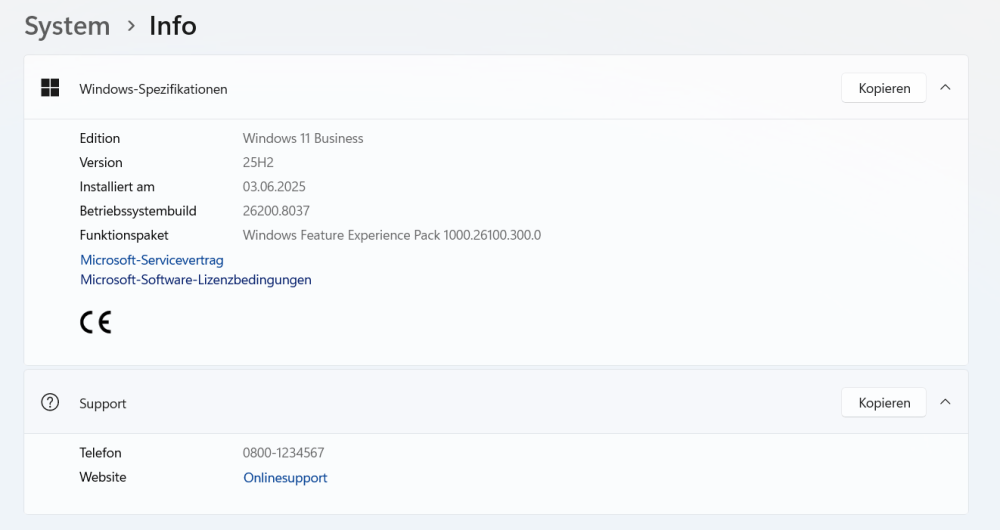
Mission accomplished.
Here are a few additional examples of how to add entries to PC Info.
Set-ItemProperty -Path "HKLM:\SOFTWARE\Microsoft\Windows\CurrentVersion\OEMInformation" -Name "Manufacturer" -Value "My Company"
Set-ItemProperty -Path "HKLM:\SOFTWARE\Microsoft\Windows\CurrentVersion\OEMInformation" -Name "Model" -Value "Workstation 2026"
Set-ItemProperty -Path "HKLM:\SOFTWARE\Microsoft\Windows\CurrentVersion\OEMInformation" -Name "SupportURL" -Value "https://support.example.com"
Set-ItemProperty -Path "HKLM:\SOFTWARE\Microsoft\Windows\CurrentVersion\OEMInformation" -Name "SupportPhone" -Value "+43 123 456789"
Set-ItemProperty -Path "HKLM:\SOFTWARE\Microsoft\Windows\CurrentVersion\OEMInformation" -Name "SupportHours" -Value "Mo-Fr 08:00-17:00"
Categories: PowerShell, Windows 10, Windows 11, Windows Server

 My name is Patrick Gruenauer. From Austria.




Hi Patrick ,
I did not found System > Info anywhere there in my Windows 11 desktop.
https://patrick6649.wordpress.com/wp-content/uploads/2026/03/image.png?w=1000
With Regards,
Manas Dash.
Plant a tree ð²and save the planet ð
LikeLike