
Install-WindowsFeature is a powerful cmdlet that enables you to install Roles and Features on Windows Server Operating Systems. In this article I am going to describe how to install Windows Server Backup on multiple Member Server in an Active Directory environment.
Preparation
I am logged in on a Domain Controller. I want to install Windows Server Backup on all Member Server of the domain, which are stored in a separate organizational unit. Let´s get a list of them. Note that you have to edit the Distinguished Name of the Organizational Unit.
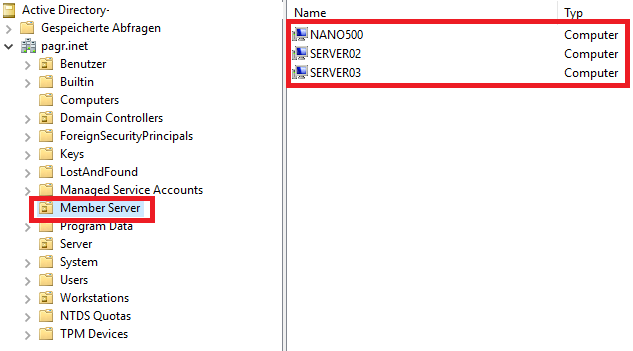
(Get-ADComputer -SearchBase "OU=Member Server,DC=pagr,DC=inet" -Filter *).Name

I strongly recommend checking the list. Otherwise you’ll catch the wrong.
Installing Windows Server Features on multiple Remote Hosts
To install, for example Windows Server Backup we have to combine our previous command with Foreach-Object. And now we call the shots:
(Get-ADComputer -SearchBase "OU=Member Server,DC=pagr,DC=inet" -Filter *).Name | Foreach-Object {Install-Windowsfeature Windows-Server-Backup}
To check whether the feature was installed successfully run Get-WindowsFeature.
Get-WindowsFeature -ComputerName server03 -Name Windows-Server-Backup

Further thoughts
For installing Roles and Features you can also use PowerShell Remote Sessions: PowerShell Remoting: How to connect to Remote Hosts in a Domain- and in a Non-Domain Environment (Trusted Hosts)
Categories: PowerShell, Windows Server

 My name is Patrick Gruenauer. From Austria.



 SID-500.COM
Hi there,
(Get-ADComputer -SearchBase “OU=Member Server,DC=pagr,DC=inet” -Filter *).Name | Foreach-Object {Install-Windowsfeature Windows-Server-Backup}
Is this still vaild syntax? When i use this, nothing happens on the remote machines. i need to use “invoke-command” after the pipe.
LikeLike
how can you specify some servers in that OU instead of all servers?
please help
Thanks in advance
LikeLike