
Do you know your neighbors? I mean the neighbors in the real word. I hope so. But what about the virtual neighbors? The PowerShell module NetTCPIP provides a command called Get-NetNeighbor. In this article, I am going to play with Get-Neighbor and try to find all my cached neighbors.
Get-NetAdapter
First check out the Interface ID (ifIndex) or name of your network adapter.
Get-NetAdapter

Get-NetNeighbor in Action
IPv4
Get-NetNeighbor -InterfaceAlias "Ethernet 2" -AddressFamily IPv4

IPv6
Get-NetNeighbor -InterfaceAlias "Ethernet 2" -AddressFamily IPv6
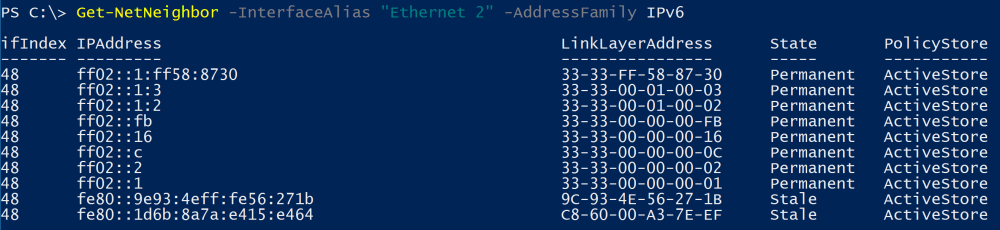
Show all IPv4 neighbors except broadcast addresses and multicast addresses
Get-NetNeighbor -AddressFamily IPv4 | Where-Object {($_.IPAddress -like "192.168.0.*") -and ($_.IPAddress -ne "192.168.0.255")}

Show all IPv6 neighbors except multicast addresses
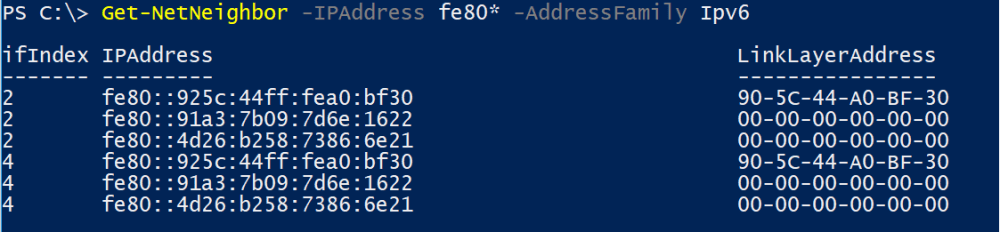
For communication on the same link Link-Local Adresses are used. To show all IPv6 neighbors with Link-Local Addresses run
Get-NetNeighbor -IPAddress fe80* -AddressFamily Ipv6
Ping all neighbors
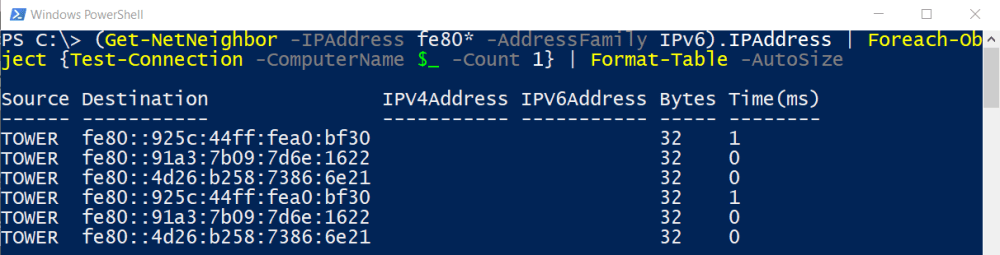
And finally try to ping all the neighbors.
IPv4
(Get-NetNeighbor -AddressFamily IPv4 | Where-Object {($_.IPAddress -like "192.168.0.*") -and ($_.IPAddress -ne "192.168.0.255")}).IPAddress | ForEach-Object {Test-Connection -ComputerName $_ -Count 1} | Format-Table -AutoSize

IPv6
(Get-NetNeighbor -IPAddress fe80* -AddressFamily IPv6).IPAddress | Foreach-Object {Test-Connection -ComputerName $_ -Count 1} | Format-Table -AutoSize
Have fun discovering your neighbors! 😉 Also see my article: The modern version of ping: Test-Connection.
Categories: PowerShell

 My name is Patrick Gruenauer. From Austria.



 SID-500.COM
1 reply »