
Enivornment Variables make life easier. In this article I describe how to use environment variables in daily work. And I am going to show some useful examples.

Enivornment Variables make life easier. In this article I describe how to use environment variables in daily work. And I am going to show some useful examples.

As the headline says, I am going to show you which tools are no longer needed when you are familiar with PowerShell. No long speeches today, just examples. I’m pretty sure some of […]
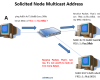
IPv6 enabled devices generate Link-Local addresses automatically. Not just Link-Local Addresses, but also a Solicited Node Multicast Address. Solicited Node Multicast Addresses are used by the Neighbor Discovery Protocol (NDP) to discover […]

This week I had the task to delete print jobs from the queue. However, some of them could not be removed. So I decided to write an article about it and also […]

Last week I got my new Surface Pro. At the same time I decided to give up my iPad Air. My plan is to do everything quick on my new iPhone X […]
In one of my previous blog posts PowerShell: Documenting your environment by running systeminfo on all Domain-Computers I have described how to list important system information of all Domain Computers by running systeminfo. […]
Firewalls control traffic. They use technology such as Stateful Inspection to establish a connection to other networks. In this article I describe how to configure the host-based Windows Firewall by using Windows […]
Is Ping a reliable way to check if a computer is available? Opinions differ … This blog post is all about ping and arp. Of course with PowerShell. The upcoming script could […]

As the headline says, there are new features available in December update of Honolulu. Honolulu is a web-based management tool which enables you to administer your infrastructure in a very comfortably way.

In most cases a blue screen is caused by hardware or driver failure. In this article I show how to find out the cause of the blue screen by using the tool […]
In this article I would like to enlight the purpose of temporary IPv6 addresses. By default, automatic IPv6 setup of Link-Local Addresses is activated on each IPv6 enabled device. This makes IPv6 […]

Most of us use https. Almost every communication is secured and encrypted with https. In this article I would like to discuss the HTTPS process in more detail and what role certificates […]
There are many encryption and decryption tools around. PowerShell is a Windows built-in tool and you can use it for cryptography as well. In this blog post I am going to play […]
In this blog post, I am going to shed some light on the new Windows Server 2016 Microsoft certifications. Much has changed and, following the general trend in education, it seems !? […]
While reading great news and improvements about the Windows 10 Fall Creators Update (1709), it might be useful to find out if the update is already installed or not.

Awarded the Microsoft MVP for PowerShell and Microsoft 365.




 SID-500.COM